
Apple TV: Shows, Movies & More
AppleEntertainment
4.18.12K Reviews
- Version
- Varies With Device
- Installs
- 100.00M
- Age Rating
- Teen
Screenshots

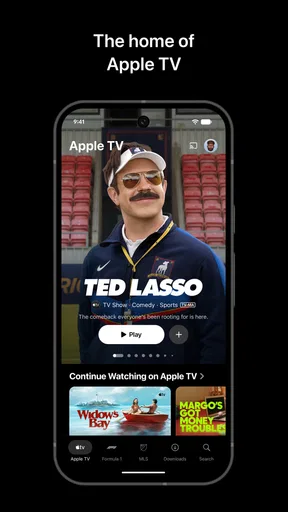


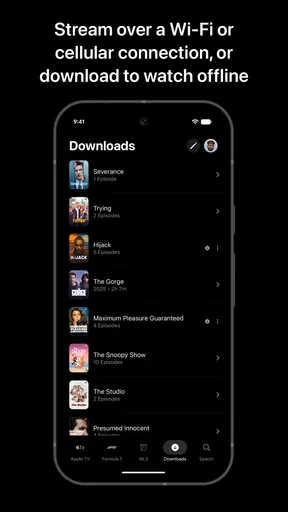


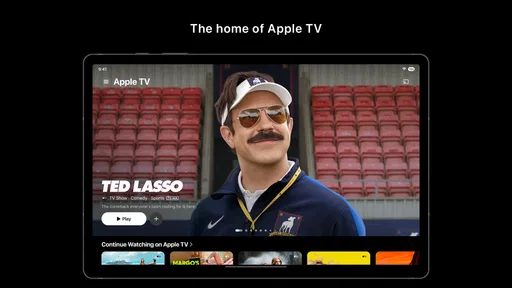
Our Review of Apple TV: Shows, Movies & More
 Analysis by Appyee
If you're anything like me, you love winding down after a long day with some quality screen time. That's where Apple TV: Shows, Movies & More comes into play. I’ve been diving headfirst into this app, and let me tell you, it’s like having a cinema in your pocket. Here’s the lowdown on what makes this app a must-have for all you entertainment enthusiasts out there.
What I Would Check Before Downloading
I’d start by asking what I want the app to do. If I mainly want a place to browse Apple’s entertainment offering and keep track of viewing, Apple TV is worth a look. If I want one service to replace every other subscription I use, I would be more cautious: a viewing hub can make discovery easier, but it does not automatically make every show or film available in one place.
Apple makes the app, which is free to download, and it sits in the entertainment category. Its Teen age rating is worth keeping in mind if children will be browsing on a shared device. The app has a 4.2 average from around 102,000 ratings, with about 4,800 written reviews, and it has passed 100 million installs. Those figures suggest broad interest, but they don’t tell me whether the available titles match my taste; I’d still check the catalog before committing to a paid plan or changing how I watch.
Getting Started with Apple TV
First things first, downloading the app is a breeze. Available on both Android and iOS, it’s just a matter of a few taps, and voila! You’re ready to delve into a world of visual delights. The user interface is sleek, intuitive, and quintessentially Apple. It feels like a warm hug from a tech-savvy friend who knows exactly what you’re in the mood for.
One practical point: installing a free app and paying for viewing are separate decisions. In-app purchases range from $9.49 to $239.99 per item, so I would read the purchase screen carefully before confirming anything. The free download is an easy way to explore, but it shouldn’t be mistaken for a promise that every piece of content is included at no cost.
Content Galore
What really sets Apple TV: Shows, Movies & More apart is its vast library. Whether you’re into edge-of-your-seat thrillers, heartwarming dramas, or rib-tickling comedies, there’s something for everyone. The app not only boasts an impressive collection of Apple Originals but also offers access to a plethora of other streaming services. It’s like having a buffet where every dish is your favorite.
The integration with other streaming platforms is seamless. You can access your subscriptions from multiple providers all in one place, making it easier than ever to switch between services without the hassle of multiple apps cluttering your home screen.
For me, the useful distinction is between a place to find and organize something to watch and the service that actually supplies it. A title appearing in a browse or search flow does not necessarily mean it is included with a subscription I already have. I’d check the title’s viewing options before settling in, especially if I’m planning a family movie night and don’t want a last-minute rental or subscription surprise.
Features That Shine
One of the features I absolutely adore is the Up Next feature. It keeps track of what you’re watching and suggests where to pick up, so you’re never left in the lurch. The app learns your preferences over time, making its recommendations a little spooky in their accuracy—but in a good way!
Another cool aspect is the Family Sharing option. You can share your subscriptions with up to six family members. It’s a great way to keep everyone entertained without breaking the bank.
A small habit makes Up Next more useful: I’d use it as a handoff point between viewing sessions, rather than assuming it replaces every provider’s own watch history. If I move between services or devices, I would check that the show is listed with the right episode before pressing play. That quick check matters most when several people share an account or when I have left a series midway through a season.
Family Sharing is most appealing when the people sharing are already part of the same household’s Apple setup. I’d confirm that the subscription and family arrangements suit everyone before relying on it as a way to split costs. It can simplify shared access, but it is not a reason to subscribe to a service unless the group actually wants its catalog.
User Experience
When it comes to usability, Apple TV doesn’t disappoint. The app is designed to be user-friendly, with easy navigation and quick access to content. No more endless scrolling or getting lost in a labyrinth of menus. The search functionality is top-notch, and the voice control feature is handy for those moments when you can’t be bothered to type.
Plus, the streaming quality is superb. Whether you're watching on a smartphone, tablet, or casting to a TV, the visuals are crisp, and buffering is virtually non-existent. It’s like having a mini-theater experience right in your living room.
In an ordinary evening, I might open the app while commuting home, add a promising title to my viewing queue, then check its availability once I’m on the couch. That is a better use of the app than browsing aimlessly for half an hour: a short search during spare time gives me a shortlist, and checking the playback option later avoids choosing something that requires a purchase I didn’t expect.
Compared with opening each streaming service separately, a shared discovery point can cut down on app-hopping and help me remember what I intended to watch. Compared with a single-provider app, though, it may feel less straightforward if I only care about that provider’s catalog and already know what I want. People who prefer a simple, dedicated library may be happier going directly to their usual service.
Where Another Option May Fit Better
I wouldn’t make Apple TV my only entertainment app without first checking how well it fits my routine. If I mostly watch live channels, follow a particular provider’s originals, or want a catalog centered on a different service, that service’s own app may be the clearer choice. If I already have several subscriptions, the convenience of browsing across them can be helpful; if I have just one, another layer of browsing may not add much.
There is also a trade-off between convenience and clarity. Keeping discovery in one place can reduce the effort of remembering which app has a show, but the actual viewing choices may still depend on subscriptions or individual purchases. I’d treat the app as a useful guide and access point, not as a guarantee that every search result is ready to play under one plan.
Why You Should Download It
In a world where content is king, Apple TV: Shows, Movies & More reigns supreme. It’s perfect for anyone who loves a good binge-watch session. The convenience of having multiple services in one app, coupled with an extensive library of high-quality content, makes it a no-brainer.
If you ask me, the app is well worth the download. It offers a little slice of escapism whenever you need it. So, grab your popcorn, settle into your favorite spot on the couch, and let Apple TV take you on a journey. Whether you’re alone or sharing the experience with loved ones, it’s sure to become a staple in your entertainment repertoire.
My recommendation is to try it if you enjoy browsing Apple Originals, want a central place to pick up viewing, or routinely lose track of what is available across your subscriptions. I’d be more hesitant if I’m trying to keep spending tightly controlled, only watch one provider, or expect the free download to unlock a complete, all-included library. The sensible approach is to explore first, check how each title can be watched, and only then decide whether a purchase or subscription fits.
Privacy and Permissions
See what permissions an app requests and how it handles your data.
- Location
- approximate location (network-based)
- Photos/Media/Files
- read the contents of your USB storage, modify or delete the contents of your USB storage
- Storage
- read the contents of your USB storage, modify or delete the contents of your USB storage
- Wi-Fi connection information
- view Wi-Fi connections
- Other
- view network connections, connect and disconnect from Wi-Fi, full network access, change your audio settings, run at startup, prevent device from sleeping
Verdict
Strengths of Apple TV: Shows, Movies & More
- High-quality streaming experience.
- Seamless integration with Apple devices.
- Wide variety of exclusive content.
- User-friendly interface for easy navigation.
- Supports offline viewing for downloads.
Limitations of Apple TV: Shows, Movies & More
- Limited content outside Apple Originals.
- Requires subscription for premium access.
- Not available on all smart TVs.
- Occasional buffering on slower networks.
- No free trial for new users.
Other Releases by Apple
View All
iTunes
Video Players & Editors4.7

Apple Music
Music & Audio4.5

Move to iOS
Tools3.6

Apple TV: Shows, Movies & More
Entertainment4.5
Similar Picks in This Category
View All
Google Play Games
Google LLC3.9

Netflix
Netflix, Inc.4.8

YouTube Kids
Google LLC4.2

Disney+
Disney4.4

Prime Video
Amazon Mobile LLC4.7

Steam
Valve Corporation3.2
You May Also Like
View All

Frequently Asked Questions
What are the main features of the Apple TV app?
The Apple TV app offers a comprehensive platform to stream your favorite TV shows, movies, and exclusive Apple Originals. Users can subscribe to premium channels, enjoy personalized recommendations, and access a vast library of content from multiple streaming services all in one place. It also supports features like offline viewing and multi-device syncing.
Is there a subscription fee for using the Apple TV app?
The Apple TV app itself is free to download and use; however, certain content and channels within the app require a paid subscription. Apple TV+ is Apple's own streaming service with a monthly fee, offering exclusive originals. Other channels and movies may also require individual purchases or rentals.
Can I download content for offline viewing on the Apple TV app?
Yes, the Apple TV app allows users to download shows and movies for offline viewing. This feature is especially useful for those who travel frequently or have limited internet access. Ensure that your device has enough storage space to accommodate the downloaded content.
On which devices is the Apple TV app available?
The Apple TV app is available on a variety of devices, including iPhones, iPads, Macs, and Apple TV hardware. Additionally, it can be accessed on some smart TVs, streaming devices like Roku and Amazon Fire TV, and gaming consoles. This cross-platform availability ensures a seamless viewing experience across all your devices.
How does the Apple TV app integrate with other streaming services?
The Apple TV app aggregates content from various streaming services, allowing users to access different libraries without switching apps. This integration simplifies content discovery by providing personalized recommendations across all subscribed services, although some services may still require separate app installations for full functionality.
